If you’ve ever configured a router, set up an online game, hosted a website, or learned about computer networking, you’ve probably come across the terms TCP and UDP. Many people search for “TCP or UDP” because they want to know which protocol is faster, more reliable, or better for their specific application. While both protocols are used to send data over the internet, they work in different ways and are designed for different purposes.
Choosing the wrong protocol can affect speed, reliability, and overall network performance. For example, online banking requires reliable data delivery, while live video streaming focuses more on speed than perfect accuracy. Understanding the difference between TCP and UDP helps network administrators, developers, students, and everyday users make better decisions.
In this guide, you’ll learn what TCP and UDP are, how they work, their advantages and disadvantages, key differences, real-world applications, common mistakes, and how to choose the right protocol for your needs.
TCP or UDP – Quick Answer
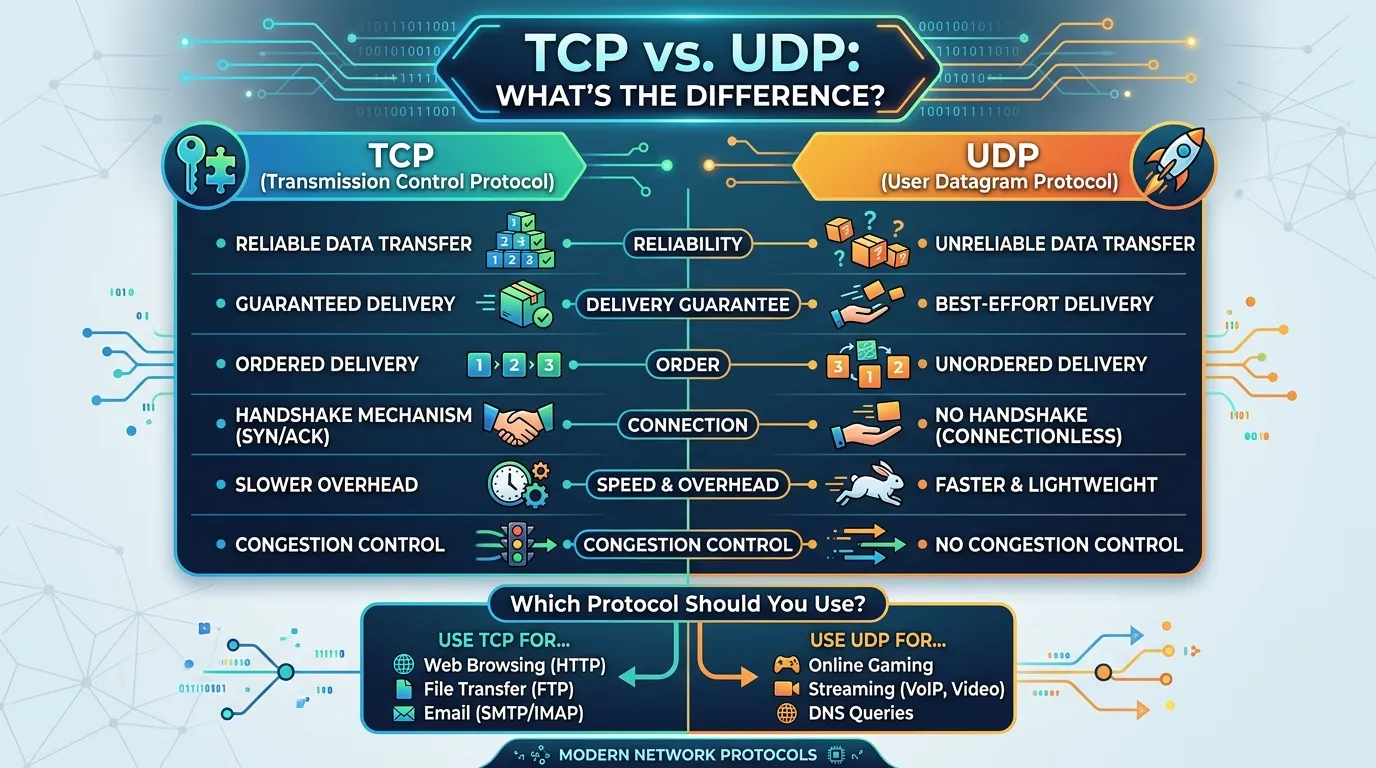
TCP (Transmission Control Protocol) is a connection-oriented protocol that guarantees reliable and accurate data delivery.
UDP (User Datagram Protocol) is a connectionless protocol that sends data quickly without checking whether every packet arrives.
Simple Examples
- TCP: Web browsing, email, file downloads, online banking.
- UDP: Online gaming, live streaming, VoIP calls, DNS lookups.
Quick Comparison
| Feature | TCP | UDP |
|---|---|---|
| Reliable | ✅ Yes | ❌ No |
| Fast | Moderate | Very Fast |
| Error Checking | Yes | Limited |
| Connection Required | Yes | No |
| Best For | Accuracy | Speed |
What Is TCP?
TCP stands for Transmission Control Protocol.
It establishes a connection between two devices before sending data. TCP ensures that every packet reaches its destination in the correct order. If any packet is lost, TCP automatically retransmits it.
Key Features
- Reliable communication
- Error detection and correction
- Packet sequencing
- Flow control
- Congestion control
Common Applications
- Websites (HTTP/HTTPS)
- Email services
- File transfers (FTP)
- Cloud storage
- Online banking
What Is UDP?
UDP stands for User Datagram Protocol.
Unlike TCP, UDP sends data without creating a connection. It does not check whether packets arrive successfully or in the correct order.
This makes UDP much faster but less reliable.
Key Features
- High speed
- Low latency
- No connection setup
- Minimal overhead
Common Applications
- Video streaming
- Voice calls (VoIP)
- Online multiplayer games
- DNS queries
- Live broadcasts
The History of TCP and UDP
TCP and UDP were developed in the early days of the Internet to solve different networking problems.
TCP was introduced in the 1970s by networking pioneers to provide reliable communication between computers. As the internet grew, TCP became the standard protocol for applications where data accuracy is essential.
UDP was later developed as a lightweight alternative for applications where speed matters more than guaranteed delivery. Instead of checking every packet, UDP simply sends data as quickly as possible.
Today, both protocols remain fundamental parts of the Internet Protocol (IP) suite and are used by billions of devices worldwide.
TCP vs UDP: Key Differences
| Feature | TCP | UDP |
|---|---|---|
| Full Name | Transmission Control Protocol | User Datagram Protocol |
| Connection | Connection-oriented | Connectionless |
| Reliability | High | Low |
| Packet Order | Guaranteed | Not Guaranteed |
| Error Recovery | Yes | No |
| Speed | Slower | Faster |
| Header Size | 20 Bytes | 8 Bytes |
| Data Loss Handling | Retransmits Packets | Ignores Lost Packets |
| Best Use | Reliable communication | Real-time communication |
How TCP Works
TCP follows these basic steps:
- Creates a connection using a three-way handshake.
- Breaks data into packets.
- Numbers each packet.
- Sends packets to the destination.
- Receives acknowledgments.
- Retransmits missing packets if necessary.
- Reassembles packets in the correct order.
This process guarantees reliable communication.
How UDP Works
UDP follows a much simpler process:
- Data is divided into packets.
- Packets are sent immediately.
- No connection is created.
- No acknowledgments are received.
- Lost packets are not retransmitted.
This allows extremely fast communication.
Which Should You Use: TCP or UDP?
The best protocol depends on your application.
Choose TCP If You Need
- Reliable communication
- Secure transactions
- Accurate file transfers
- Email delivery
- Website loading
Choose UDP If You Need
- Fast response
- Live video
- Online gaming
- Voice communication
- Real-time streaming
General Recommendation
| Application | Recommended Protocol |
|---|---|
| Web Browsing | TCP |
| TCP | |
| Online Banking | TCP |
| Video Streaming | UDP |
| Voice Calls | UDP |
| Online Gaming | UDP |
| File Downloads | TCP |
| DNS | UDP |
Common Mistakes When Choosing TCP or UDP
Mistake 1
Using UDP for financial transactions.
Correct: Use TCP because every packet must arrive correctly.
Mistake 2
Using TCP for live gaming.
Correct: UDP provides lower latency.
Mistake 3
Assuming UDP is always better because it’s faster.
Correct: Speed is useful only when occasional packet loss is acceptable.
Mistake 4
Thinking TCP is always slow.
Correct: TCP is optimized for reliability and performs efficiently in most applications.
TCP or UDP in Everyday Examples
Uses TCP because every message must arrive correctly.
Online Banking
Uses TCP to protect financial transactions.
YouTube Live
Mostly uses UDP for smooth video playback.
Zoom Meetings
Often relies on UDP for real-time voice and video.
Online Games
Most multiplayer games prefer UDP to reduce lag.
DNS Lookup
Usually uses UDP because requests are very small and need fast responses.
TCP or UDP – Google Trends & Usage Data
Searches for “TCP or UDP” remain popular throughout the year because networking is an essential topic in education, IT certifications, cybersecurity, cloud computing, and software development.
The keyword is frequently searched by:
- Computer science students
- Network engineers
- Cybersecurity professionals
- System administrators
- Cloud engineers
- Software developers
Countries with high search interest include:
- United States
- India
- United Kingdom
- Canada
- Germany
- Australia
- Pakistan
People commonly search this topic while preparing for networking certifications such as CCNA, CompTIA Network+, and AWS.
TCP vs UDP Comparison Table
| Feature | TCP | UDP |
|---|---|---|
| Reliable | ✅ | ❌ |
| Fast | ❌ | ✅ |
| Connection Required | ✅ | ❌ |
| Error Recovery | ✅ | ❌ |
| Packet Ordering | ✅ | ❌ |
| Streaming | ❌ | ✅ |
| Gaming | ❌ | ✅ |
| Web Browsing | ✅ | ❌ |
| ✅ | ❌ | |
| File Transfer | ✅ | ❌ |
Frequently Asked Questions (FAQs)
1. What is the main difference between TCP and UDP?
TCP guarantees reliable data delivery, while UDP focuses on speed without guaranteeing packet delivery.
2. Which is faster, TCP or UDP?
UDP is generally faster because it doesn’t establish a connection or retransmit lost packets.
3. Why do online games use UDP?
UDP reduces latency, providing faster communication that improves gameplay.
4. Is TCP more secure than UDP?
TCP itself is not inherently more secure, but many secure internet protocols, such as HTTPS, are built on TCP because of its reliable communication.
5. Does UDP guarantee packet delivery?
No. UDP sends packets without confirming whether they arrive.
6. Which protocol does HTTP use?
HTTP and HTTPS use TCP to ensure reliable communication between web browsers and servers.
7. Can an application use both TCP and UDP?
Yes. Many modern applications use TCP for reliable tasks and UDP for real-time features like voice or video.
Conclusion
Understanding the difference between TCP or UDP is essential for anyone working with computer networks, websites, applications, or online services. Although both protocols transmit data across the internet, they are designed for different purposes. TCP prioritizes reliability by ensuring every packet reaches its destination in the correct order, making it ideal for web browsing, file transfers, email, and financial transactions. UDP, on the other hand, sacrifices guaranteed delivery for speed and low latency, making it the preferred choice for online gaming, live streaming, VoIP calls, and DNS queries.
There is no universal winner between TCP and UDP. The right choice depends entirely on your application’s requirements. If data accuracy is critical, choose TCP. If real-time performance matters more than occasional packet loss, UDP is the better option. By understanding how each protocol works and where it excels, you can make informed networking decisions and optimize performance for your specific use case.